Due Date Reminder with Payment Portal
Documentation version 2.0
Introduction
Thank you for your interest in this project—you’re awesome! 🎉
This documentation will help you integrate an automated PPPoE client reminder system for MikroTik, ensuring users are notified of their due dates.
Additionally, clients can conveniently pay their dues via popular e-wallets like GCash, Maya, Grab, ShopeePay, and more. Enjoy seamless automation and enhanced user convenience with these powerful features! 🚀
- Automated Disconnection – Instantly disconnects PPPoE users when their due date arrives.
- Smart Payment Reminder – A notification page automatically appears on users’ devices, prompting payment.
- Seamless Reconnection – Users are automatically reconnected once payment is completed via the reminder portal.
Sustainability & Fees
While I’d love to offer this service for free, maintaining the project comes with ongoing expenses (e.g., server maintenance, SSL certificates, domains, payment gateways, VPNs, etc.). To keep it running smoothly, a small fee structure is in place:- One-time License/Portal key Fee – ₱1000
- Transaction Fee – 5% per successful payment. Example: A ₱100 bill payment credits ₱95 to your GCash account.
- Transfer Fee – Fixed ₱15 per disbursement.
How it works
I created a Full and Quick demonstration which you can find below:
Getting Started
You will need to do the following.
- Purchase a Portal key for PPPoE server (comes with VPN account)
- Run Mikrotik scripts to your terminal
A bit overwhelming? I gotchu fam!
Purchase Portal Key

Step 1: Register to WiFree Network
Go to https://payments.wifree.network/register.html to register.
Once registered, head over to WiFree Network login page here.
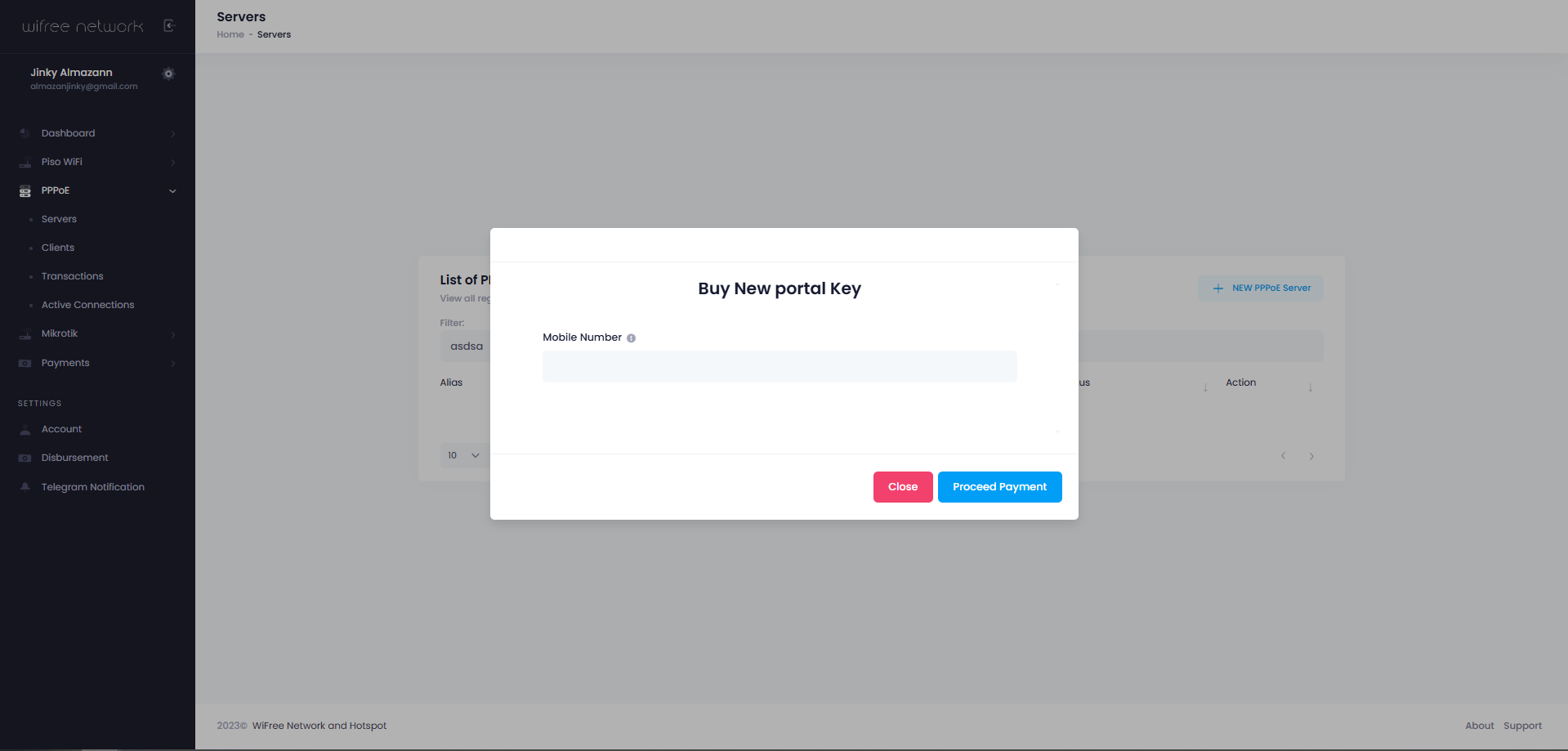
Step 2: Buy Portal Key
Navigate to PPPoE > Servers, then click + NEW PPPoE Server button.
- Click Buy Portal Key button.
- Input your GCash Number
- then click Proceed Payment

Step 3: Proceed with Payment
You will be redirected to checkout page once you click the generated checkout link. You may select any EWallet or Bank to proceed with the purchase, just follow to on-screen instruction after selecting the preferred channel.

Step 4: Generating your portal keys
Yup, we need you to wait.
You will be redirected to success page after payment. System is now processing your portal keys along with VPN account.
It would just take at least more or less than 5 minutes to generate your credentials.
Keep the browser open and refresh every 5 minutes until you can see your account credentials
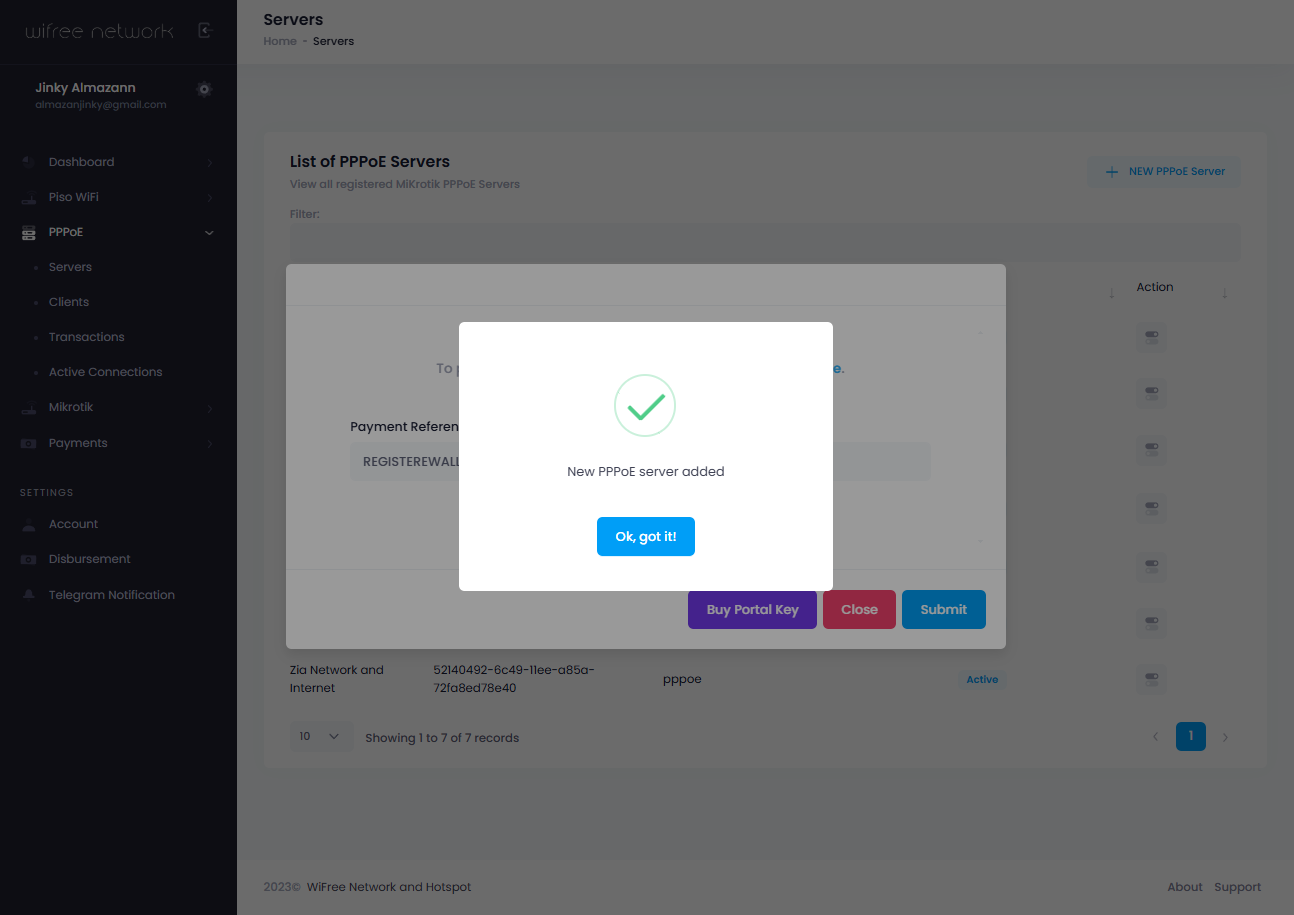
Step 5: Adding your credentials to Dashboard
Copy the payment reference number then head back to your dashboard.
- Click + NEW PPPoE Server button.
- Paste the Payment reference number
- then click Submit
Congratulations! You've successfully bought a portal key and added it to your dashboard account. You are now ready to install the Payment Reminder
Installing Payment Reminder
Be sure that you are done purchasing VPN account first before proceeding on this step.
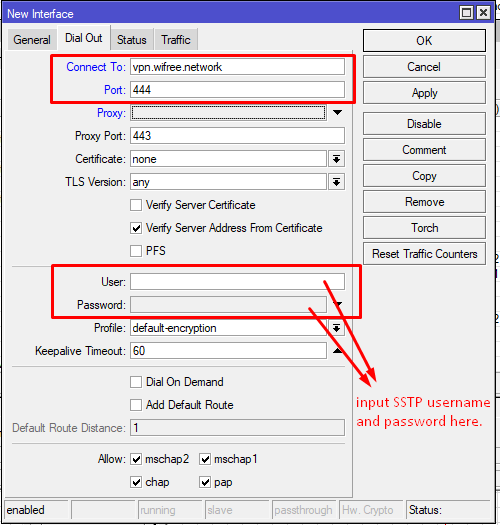
Step 1: Adding SSTP Client account
Open your Mikrotik via Winbox- Navigate to Interface
- Click the + button
- Click SSTP Client
- - Connect To: vpn.wifree.network
- - Port: 444
- - User: Your SSTP username
- - Password: Your SSTP Password
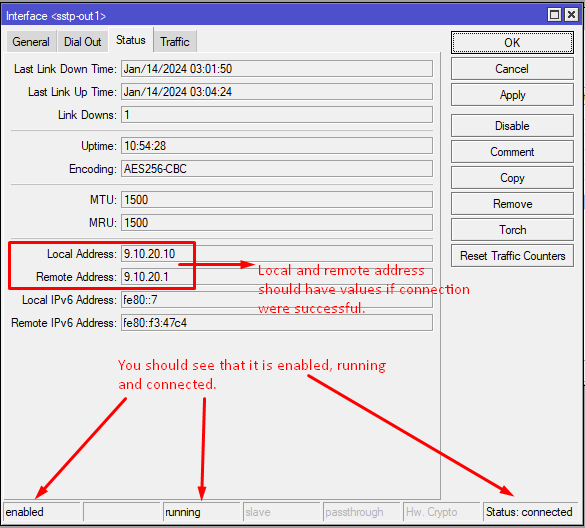
Step 2: Check the SSTP Client Status
Once done with Step 1, navigate to Status Tab- You should see Enable on lower right
- Also indicated that SSTP client is running
- The status is Connected
- Local and Remote IP should have values populated
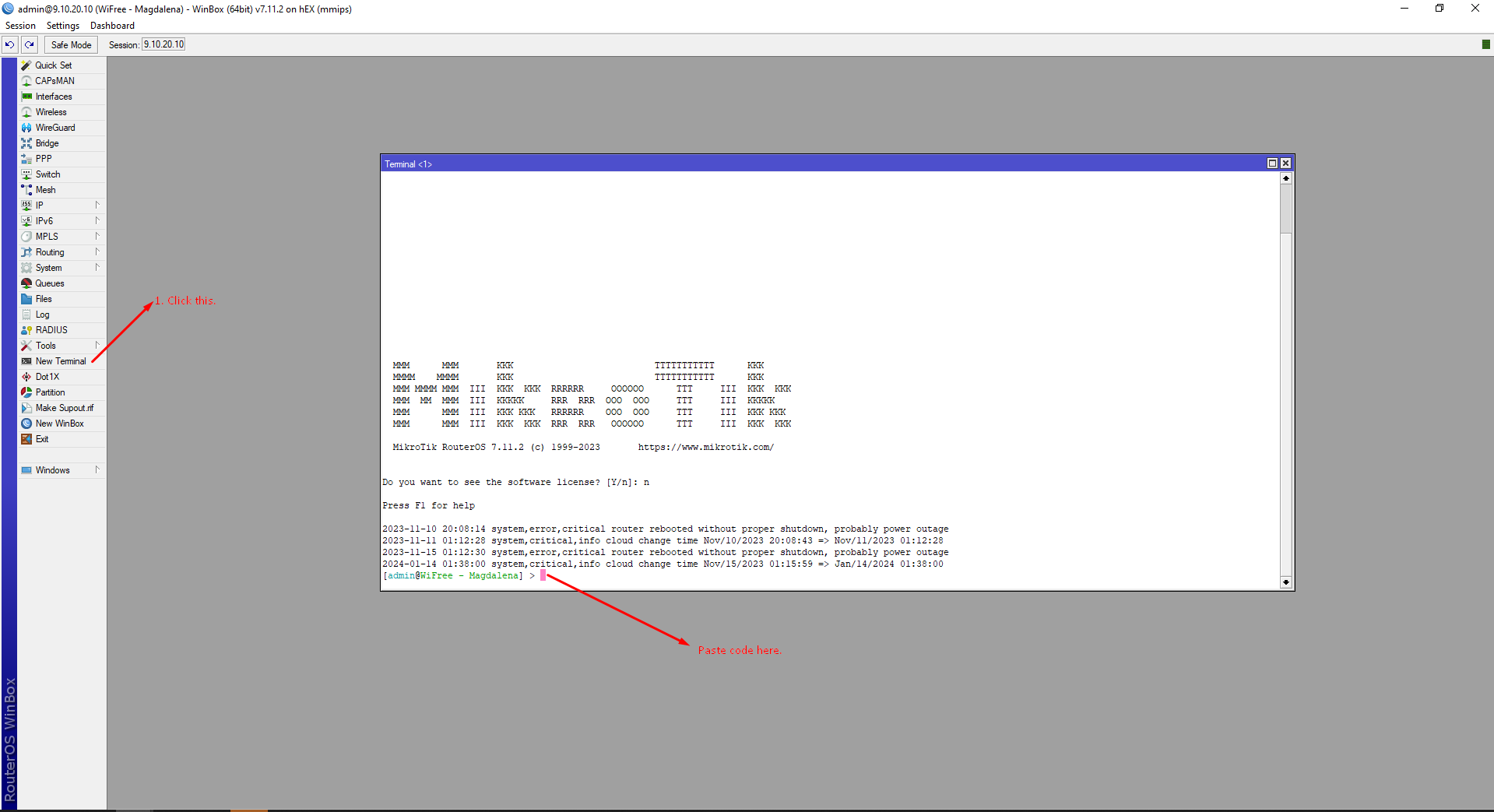
Step 3: Paste code to Mikrotik Terminal
/ip pool
add comment=Reminder name=Reminder ranges=50.0.0.2-50.0.0.254
/ppp profile
add comment=Reminder local-address=50.0.0.1 name=Reminder on-down=reminderdown on-up=reminderup rate-limit=10M/10M remote-address=Reminder
/ip firewall address-list
add address=50.0.0.0/24 list=Reminder
add address=gcash.com list=reminder-allow-site
add address=assets.xendit.co list=reminder-allow-site
add address=checkout-ui-gateway.xendit.co list=reminder-allow-site
add address=payments.gcash.com list=reminder-allow-site
add address=xendit.co list=reminder-allow-site
add address=maya.ph list=reminder-allow-site
add address=pg-sandbox.paymaya.com list=reminder-allow-site
add address=api.paymaya.com list=reminder-allow-site
add address=ewallet-service-live.xendit.co list=reminder-allow-site
add address=wifree.network list=reminder-allow-site
add address=gw.alipayobjects.com list=reminder-allow-site
add address=irisk-sea.alipay.com list=reminder-allow-site
add address=grabpay-connector-live.xendit.co list=reminder-allow-site
add address=weblogin.grab.com list=reminder-allow-site
add address=partner-api.grab.com list=reminder-allow-site
add address=grab.com list=reminder-allow-site
add address=pay.grab.com list=reminder-allow-site
add address=app.appsflyer.com list=reminder-allow-site
add address=shopee.ph list=reminder-allow-site
add address=wsa.wallet.airpay.com.ph list=reminder-allow-site
add address=connect.paymaya.com list=reminder-allow-site
add address=digicert.com list=reminder-allow-site
add address=checkout.xendit.co list=reminder-allow-site
add address=mynt.xyz list=reminder-allow-site
add address=mgs-gw.paas.mynt.xyz list=reminder-allow-site
add address=traefik-public.ap-southeast-1.tidnex.com list=reminder-allow-site
add address=paas.mynt.xyz list=reminder-allow-site
add address=www.recaptcha.com list=reminder-allow-site
add address=js.xendit.co list=reminder-allow-site
add address=xnd-merchant-logos.s3.amazonaws.com list=reminder-allow-site
add address=cloudfront.net list=reminder-allow-site
add address=snowflow-collector.iluma.ai list=reminder-allow-site
add address=beacons.gvt2.com list=reminder-allow-site
add address=beacons.gcp.gvt2.com list=reminder-allow-site
add address=discover-pa.googleapis.com list=reminder-allow-site
add address=fonts.googleapis.com list=reminder-allow-site
add address=www.googletagmanager.com list=reminder-allow-site
add address=content-autofill.googleapis.com list=reminder-allow-site
add address=payments.wifree.network list=reminder-allow-site
add address=challenges.cloudflare.com list=reminder-allow-site
add address=cnd.growthbook.io list=reminder-allow-site
add address=iluma.ai list=reminder-allow-site
add address=datadoghq-browser-agent.com list=reminder-allow-site
add address=cdn.jsdelivr.net list=reminder-allow-site
add address=client4.google.com list=reminder-allow-site
add address=www.gstatic.com list=reminder-allow-site
add address=snowplow-collector.iluma.ai list=reminder-allow-site
add address=cdn.growthbook.io list=reminder-allow-site
add address=gcash-api.pulseid.com list=reminder-allow-site
add address=mss.paas.mynt.xyz list=reminder-allow-site
add address=api.mynt.xyz list=reminder-allow-site
add address=login.mynt.xyz list=reminder-allow-site
add address=customer-segment-api.mynt.xyz list=reminder-allow-site
add address=mdap.paas.mynt.xyz list=reminder-allow-site
add address=cdnjs.cloudflare.com list=reminder-allow-site
add address=xqd9eal.x.incapdns.net list=reminder-allow-site
add address=rum-ingest.us1.signalfx.com list=reminder-allow-site
add address=110.75.232.97 list=reminder-allow-site
add address=110.75.232.98 list=reminder-allow-site
add address=110.75.232.99 list=reminder-allow-site
add address=110.75.232.100 list=reminder-allow-site
add address=xen.to list=reminder-allow-site
add address=18.138.78.193 list=reminder-allow-site
add address=3.0.107.195 list=reminder-allow-site
add address=3.1.78.74 list=reminder-allow-site
add address=e9816.cj.akamaiedge.net list=reminder-allow-site
add address=104.67.185.229 list=reminder-allow-site
add address="ab448ad13c5be11eab89b06680ff93a5-46768361.ap-southeast-1.elb.amazonaws.com" list=reminder-allow-site
add address=stats.g.doubleclick.net list=reminder-allow-site
add address=www.google-analytics.com list=reminder-allow-site
add address=cloudflareinsights.com list=reminder-allow-site
add address=d39ewjhej4wmka.cloudfront.net list=reminder-allow-site
add address=cdnj.cloudflare.com list=reminder-allow-site
add address=api.xendit.co list=reminder-allow-site
add address=payments-web-assets.maya.ph list=reminder-allow-site
add address=www.digicert.com list=reminder-allow-site
add address=www.xendit.co list=reminder-allow-site
add address=www.google-analytics.com list=reminder-allow-site
add address=9.10.0.0/18 list=reminder-allow-site
add address=mobilegw.alipay.com list=reminder-allow-site
add address=m-gcash-com.s3.ap-southeast-1.amazonaws.com list=reminder-allow-site
add address=iclientgw-sea.alipay.com list=reminder-allow-site
add address=imgs-ac.alipay.com list=reminder-allow-site
add address=ilog-sea-aliyun.aliplus.com list=reminder-allow-site
add address=payments.paymaya.com list=reminder-allow-site
add address=api-bnpl.mayabank.ph list=reminder-allow-site
add address=api.mayabank.ph list=reminder-allow-site
add address=assets.maya.ph list=reminder-allow-site
add address=payments.maya.ph list=reminder-allow-site
add address=shopeepay.ph list=reminder-allow-site
add address=deo.shopeemobile.com list=reminder-allow-site
add address=pay.shopee.sg list=reminder-allow-site
add address=dem.shopee.com list=reminder-allow-site
add address=c-api-bit.shopeemobile.com list=reminder-allow-site
add address=api.gw.shopeepay.ph list=reminder-allow-site
add address=df.infra.shopee.ph list=reminder-allow-site
add address=iam-assets.paymaya.com list=reminder-allow-site
/ip hotspot walled-garden ip
add action=accept disabled=no !dst-address dst-address-list=reminder-allow-site !dst-port !protocol !src-address !src-address-list
/ip firewall filter
add action=accept chain=input comment="Allow established/related input" connection-state=established,related src-address-list=EXPIRED_CLIENT
add action=accept chain=forward comment="Allow established/related forward" connection-state=established,related src-address-list=EXPIRED_CLIENT
add action=accept chain=output comment="Allow established/related output" connection-state=established,related src-address-list=EXPIRED_CLIENT
add action=accept chain=forward comment="Allow DNS for EXPIRED_CLIENTS" dst-port=53 protocol=udp src-address-list=EXPIRED_CLIENT
add action=accept chain=output comment="Allow router to fetch payment sites for proxy" dst-address-list=reminder-allow-site dst-port=80,443 protocol=tcp src-address-list=EXPIRED_CLIENT
add action=accept chain=forward comment="Allow EXPIRED_CLIENT to payment related IPs (direct)" dst-address-list=reminder-allow-site dst-port=80,443 protocol=tcp src-address-list=EXPIRED_CLIENT
add action=drop chain=forward comment="DROP all other TCP from EXPIRED_CLIENTs" dst-port=80,443 protocol=tcp src-address-list=EXPIRED_CLIENT
add action=drop chain=forward comment="DROP all other UDP from EXPIRED_CLIENTs" dst-port=80,443 protocol=udp src-address-list=EXPIRED_CLIENT
add action=drop chain=forward comment="DROP ALL FORWARD traffic for specific expired client" src-address-list=EXPIRED_CLIENT
/ip firewall nat
add action=masquerade chain=srcnat comment=Reminder src-address-list=EXPIRED_CLIENT
add action=masquerade chain=srcnat comment=Reminder src-address=9.10.20.1
add action=redirect chain=dstnat comment=Reminder dst-port=80 protocol=tcp src-address-list=EXPIRED_CLIENT to-ports=5002
/ip proxy
set enabled=yes port=5002 src-address=0.0.0.0
/ip proxy access
add dst-host=wifree.network
add dst-host=payments.wifree.network
add dst-host=xendit.co
add dst-host=checkout.xendit.co
/ip proxy access
Next, you will need to create a script by navigating to System > Script > + sign button. Don't forget to replace REPLACE-WITH-YOUR-PORTAL-KEY before adding this to the script. Once done, name the script pppoe-expiry-checker
# --- CONFIGURATION
:local portalKey "REPLACE-WITH-YOUR-PORTAL-KEY";

:log warning "PPP SCRIPT STARTED";

# --- Robust RouterOS Version Detection ---
:local rosVersion [/system resource get version];
:local isV7 false;

:if ([:find $rosVersion "7."] = 0) do={
    :set isV7 true;
}

:log warning ("ROS VERSION=" . $rosVersion);
:log warning ("IS V7=" . [:tostr $isV7]);


# --- Date Handling Engine with Padding Sanity Check ---
:local currentDate [/system clock get date];
:local month [:pick $currentDate 0 3];
:local day [:pick $currentDate 4 6];
:local year [:pick $currentDate 7 11];

# Fix single-digit days (e.g. " 5" becomes "05") to prevent comparison crashes
:if ([:pick $day 0 1] = " ") do={
    :set day ("0" . [:pick $day 1 2]);
}

# Map 3-letter months to digits dynamically to avoid cross-month parsing failures
:local months {"jan"="01";"feb"="02";"mar"="03";"apr"="04";"may"="05";"jun"="06";"jul"="07";"aug"="08";"sep"="09";"oct"="10";"nov"="11";"dec"="12"};
:local monthNumber ($months->$month);

:local today ($year . "-" . $monthNumber . "-" . $day);
:log warning ("TODAY=" . $today);

:foreach activeUser in=[/ppp active find] do={

    :local username [/ppp active get $activeUser name];
    :local secretId [/ppp secret find name=$username];

    :if ([:len $secretId] > 0) do={

        :local comment [/ppp secret get $secretId comment];
        :log warning ("USER=" . $username);
        :log warning ("COMMENT=" . $comment);

        :local firstDot [:find $comment "."];

        :if ($firstDot != nil) do={

            :local expiry [:pick $comment 0 $firstDot];
            :local remaining [:pick $comment ($firstDot + 1) [:len $comment]];

            :local secondDot [:find $remaining "."];
            :local bill [:pick $remaining 0 $secondDot];

            :local remaining2 [:pick $remaining ($secondDot + 1) [:len $remaining]];
            :local thirdDot [:find $remaining2 "."];
            :local profile "";

            :if ($thirdDot != nil) do={
                :set profile [:pick $remaining2 0 $thirdDot];
            } else={
                :set profile $remaining2;
            }

            :log warning ("EXPIRY=" . $expiry);
            :log warning ("BILL=" . $bill);
            :log warning ("PROFILE=" . $profile);

            :local todayNumber ([:pick $today 0 4] . [:pick $today 5 7] . [:pick $today 8 10]);
            :local expiryNumber ([:pick $expiry 0 4] . [:pick $expiry 5 7] . [:pick $expiry 8 10]);

            :log warning ("TODAY NUMBER=" . $todayNumber);
            :log warning ("EXPIRY NUMBER=" . $expiryNumber);

            # --- MAIN CONDITIONAL: EXPIRED VS ACTIVE ---
            :if ($todayNumber >= $expiryNumber) do={

                :log warning ("USER EXPIRED=" . $username);
                :local userIp [/ppp active get $activeUser address];

                :local apiUrl ("https://payments.wifree.network/get_pppoe_redirect.php?portal_key=" . $portalKey . "&profile=" . $profile . "&account_name=" . $username . "&bill=" . $bill);
                :log warning ("API URL=" . $apiUrl);

                :do {
                    /tool fetch url=$apiUrl mode=https keep-result=yes dst-path="pppoe_redirect.json" check-certificate=no;
                    :log warning "FETCH SUCCESS";

                    :local fileContent [/file get pppoe_redirect.json contents];
                    :log warning ("API RESPONSE=" . $fileContent);

                    :local start [:find $fileContent "\"redirect_url\":\""];

                    :if ($start != nil) do={

                        :set start ($start + 16);
                        :local end [:find $fileContent "\"" $start];
                        :local redirectUrl [:pick $fileContent $start $end];
                        :log warning ("REDIRECT URL=" . $redirectUrl);

                        # --- Dynamic Address List Handling ---
                        :local existingAddr [/ip firewall address-list find list="EXPIRED_CLIENT" comment=$username];

                        :if ([:len $existingAddr] = 0) do={
                            /ip firewall address-list add list="EXPIRED_CLIENT" address=$userIp comment=$username;
                            :log warning ("ADDED EXPIRED_CLIENT=" . $username . " WITH IP " . $userIp);
                        } else={
                            :local oldIp [/ip firewall address-list get $existingAddr address];
                            :if ($oldIp != $userIp) do={
                                /ip firewall address-list set $existingAddr address=$userIp;
                                :log warning ("UPDATED EXPIRED_CLIENT IP FOR " . $username . " FROM " . $oldIp . " TO " . $userIp);
                            } else={
                                :log warning ("ALREADY IN EXPIRED_CLIENT WITH CORRECT IP=" . $username);
                            }
                        }

                        # --- Dynamic Web Proxy Handling (Completely String Isolated) ---
                        :local existingProxy [/ip proxy access find comment=$username];

                        :if ([:len $existingProxy] = 0) do={
                            :local pAction "deny";
                            :local pTarget "redirect-to";

                            :if ($isV7 = true) do={
                                :set pAction "redirect";
                                :set pTarget "action-data";
                            }

                            :local createString ("/ip proxy access add src-address=" . $userIp . " action=" . $pAction . " " . $pTarget . "=\"" . $redirectUrl . "\" comment=\"" . $username . "\"");
                            :local execCreate [:parse $createString];
                            $execCreate;

                            :log warning ("PROXY REDIRECT RULES GENERATED WITH FULL PARAMETERS FOR=" . $username);
                        } else {
                            # Check parameters dynamically using string evaluations to stop cross-version compiler checking errors
                            :local oldProxyIp [/ip proxy access get $existingProxy src-address];
                            :local oldProxyUrl "";
                            :local pTarget "redirect-to";

                            :if ($isV7 = true) do={
                                :set oldProxyUrl [/ip proxy access get $existingProxy action-data];
                                :set pTarget "action-data";
                            } else={
                                :set oldProxyUrl [/ip proxy access get $existingProxy redirect-to];
                            }

                            :if ($oldProxyIp != $userIp || $oldProxyUrl != $redirectUrl) do={
                                # Wrap update instructions inside parsed text string execution to keep it safe
                                :local updateString ("/ip proxy access set " . $existingProxy . " src-address=" . $userIp . " " . $pTarget . "=\"" . $redirectUrl . "\"");
                                :local execUpdate [:parse $updateString];
                                $execUpdate;

                                :log warning ("UPDATED PROXY REDIRECT LINK/IP FOR " . $username);
                            } else={
                                :log warning ("PROXY REDIRECT ALREADY EXISTS WITH CORRECT DATA=" . $username);
                            }
                        }

                    } else={
                        :log error "redirect_url not found";
                    }

                } on-error={
                    :log error "FETCH FAILED";
                }

            } else {
                # --- SELF CLEANING BLOCK ---
                :log warning ("USER NOT EXPIRED / EXTENDED=" . $username);

                # 1. Clean up from Address List
                :local expiredAddr [/ip firewall address-list find list="EXPIRED_CLIENT" comment=$username];
                :if ([:len $expiredAddr] > 0) do={
                    /ip firewall address-list remove $expiredAddr;
                    :log warning ("REMOVED FROM EXPIRED_CLIENT ADDRESS LIST=" . $username);
                }

                # 2. Clean up from Web Proxy Access
                :local expiredProxy [/ip proxy access find comment=$username];
                :if ([:len $expiredProxy] > 0) do={
                    /ip proxy access remove $expiredProxy;
                    :log warning ("REMOVED FROM WEB PROXY ACCESS=" . $username);
                }
            }
        }
    }
}

:log warning "PPP SCRIPT COMPLETED";
After that, paste this script below in your MikRotik Terminal
/system scheduler add interval=5m name=pppoe-expiry-checker-scheduler on-event=pppoe-expiry-checker policy=read,write,test,policy start-date=jan/01/1970 start-time=00:00:00
Step 4: Filter Rules and NAT
Once you're done with Step 3, you should see new entries on your Firewall and NAT. With that, we would need to move the entries to top most.
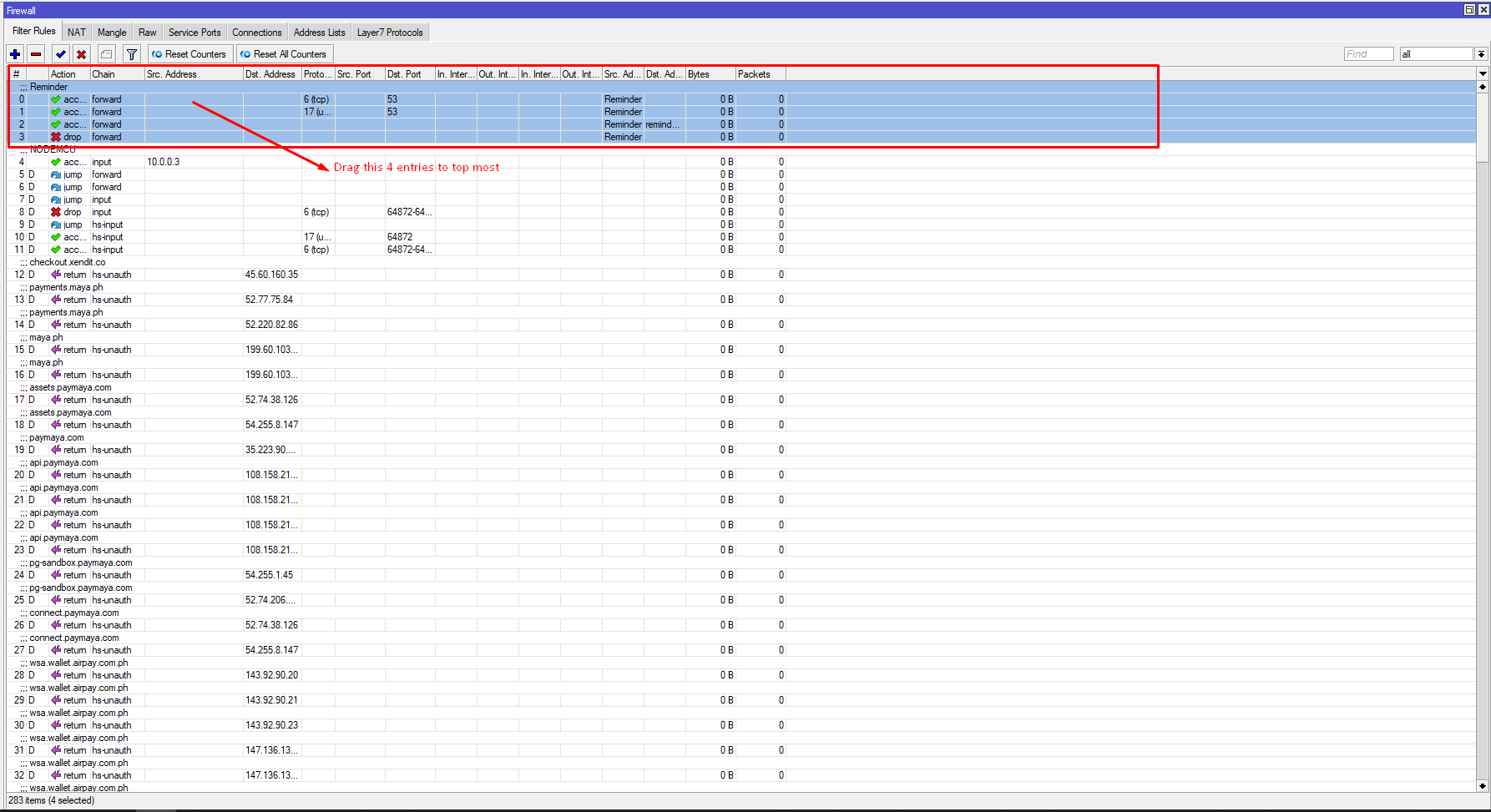
Navigate to Firewall > Filter Rules, then move the Reminder forward and drop forward to top most. Below is a sample screenshot:
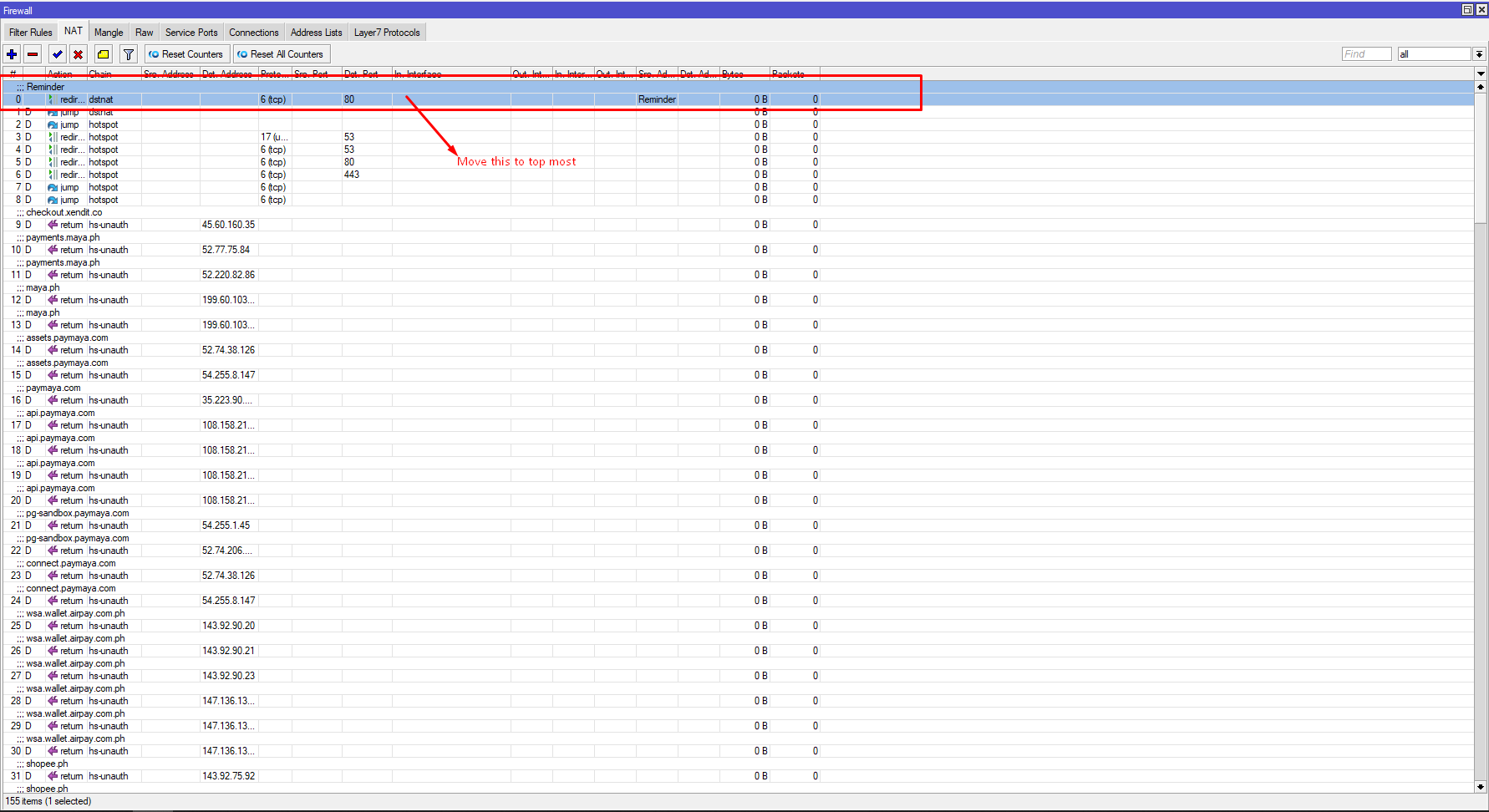
After that, navigate to Firewall > NAT, then move the reminder chain to top most. Below is a sample screenshot:
Step 5: Creating user account with full access
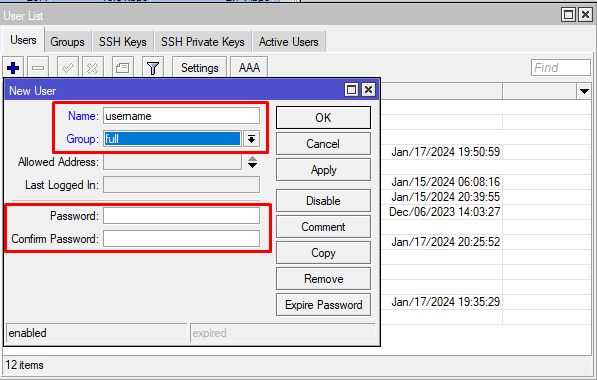
This system will utilize Mikrotik API in order to build your client's due date reminder page and payment portal. With that, we would need you to create a dedicated account for this use case. To create an account:- Navigate to System, then Users
- Click the + button
- Add Name and Password/Confirm Password
- Make sure that the full is selected under Group

Step 6: Check if Mikrotik API services is enabled
Yes, we need to double-check if your Mikrotik API services is enabled. To do this,- Open your Mikrotik WinBox
- Navigate to IP, then Services
- api should be enabled
- Port should be 8728
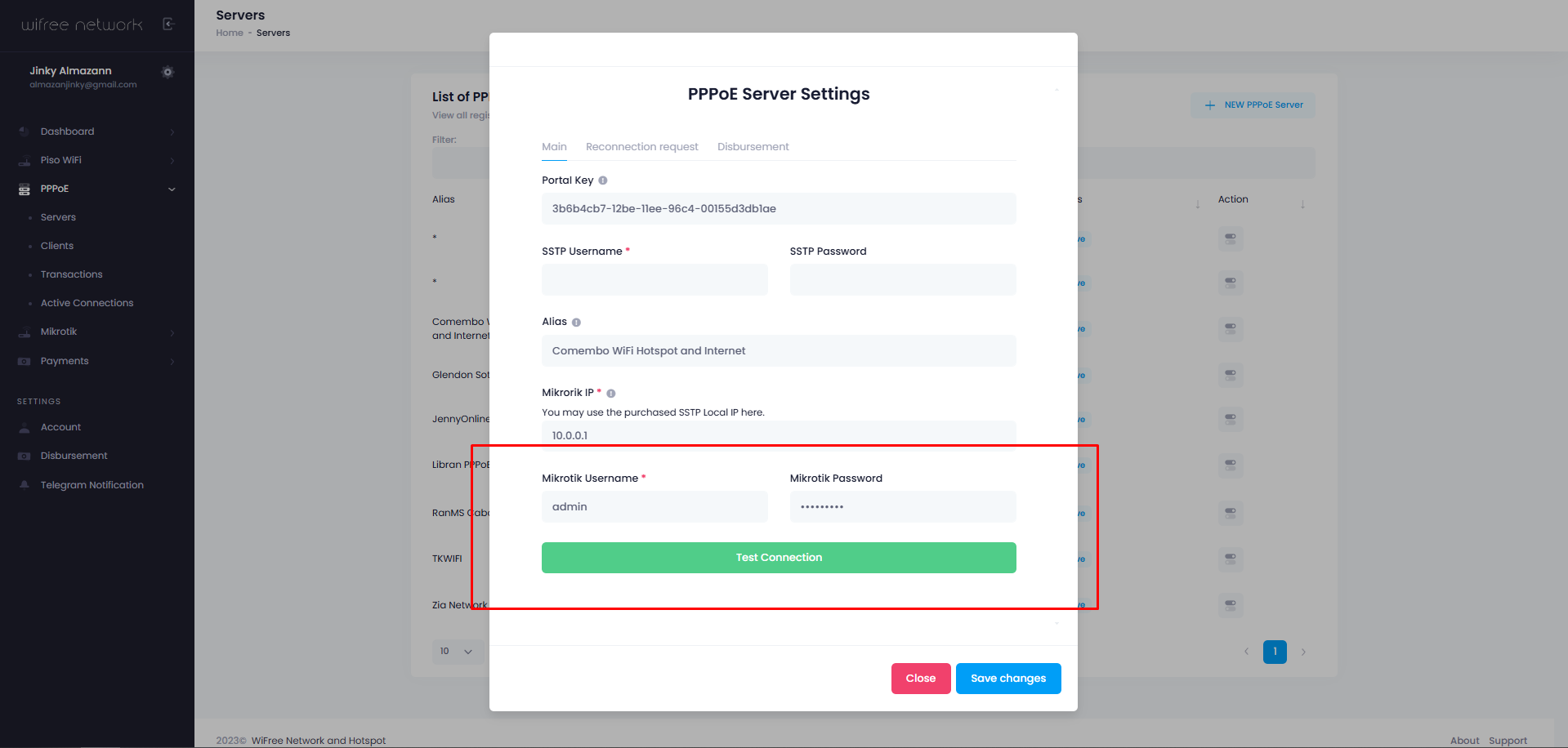
Step 7: Saving Mikrotik Credentials
Head back to WiFree Network dashboard, then do the following:- Select your portal key
- Add your Mikrotik username and password
- Click Test connection
- You should see a "Test connection success". Click Save changes button.
Optional: Receive Telegram notification
Doing this step will enable you to receive a telegram notification of the following:- When your PPPoE clients dues
- When your PPPoE clients requested for temporary reconnection. Here's the video: https://youtu.be/87Wo7pE4hrs?si=LK0lRoNRFH__X8Qb
- Client made a payment to payment portal
Open Telegram app, search for the bot wifree_alert_bot, then click start or type /start
Note: This will be the same process on Mobile phone.
You should receive a message response just like this:
Hi,

Thank you for availing PPPoE/Hotspot GCASH payment.
Here's your ChatID: 801107489
Take note of the ChatID.
Head back to WiFree Network dashboard, then do the following:
- Select your portal key
- Click Disbursement tab
- Add the Chat ID on Telegram Chat ID